

WordPress去掉index.php的方法主要有两个步骤
修改固定连接
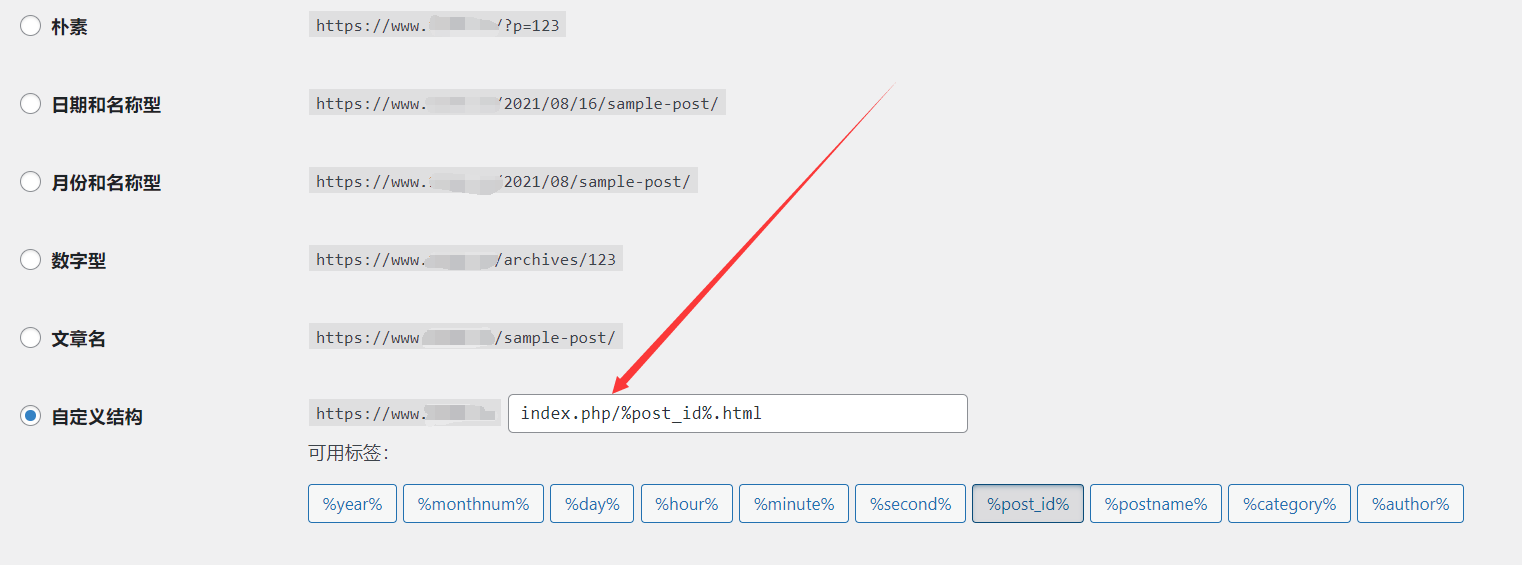
如果配置后Url中依然带有index.php,请登录WordPress后台检查固定链接,打开WordPress后台依次选择‘设置/固定链接’在出现的页面中,选择‘自定义结构’,是否 设置的使用index.php 如果有,去除即可。
设置重写规则
这个需要根据你的web服务器来决定
Apache 静态链接重写规则
在 WordPress 网站目录下,新建一个 .htaccess 文件,并写入下面的代码
<IfModule mod_rewrite.c>
RewriteEngine On
RewriteBase /
RewriteRule ^index\.php$ - [L]
RewriteCond %{REQUEST_FILENAME} !-f
RewriteCond %{REQUEST_FILENAME} !-d
RewriteRule . /index.php [L]
</IfModule>
Nginx 静态链接重写规则
编辑 nginx 的配置文件 nginx.cnf,在 server {} 配置内容中,写入下面的代码
location / {
    if (-f $request_filename/index.html){
        rewrite (.*) $1/index.html break;
    }
    if (-f $request_filename/index.php){
        rewrite (.*) $1/index.php;
    }
    if (!-f $request_filename){
        rewrite (.*) /index.php;
    }
}
然后重启 nginx,这样就能把 wordpress 链接中的 index.php 去掉。
以上就是wordpress去除index.php的方法的详细内容

